The classifier
How the classifier works
The classifier takes an operation (name and arguments) and returns a classification: what the operation does, what it targets, how confident the classifier is, and what evidence supports the classification.
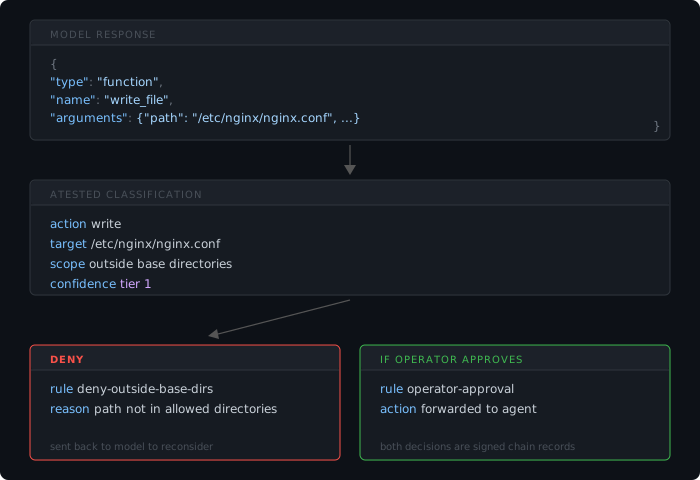
The classification output
Every operation produces a classification with these fields:
action_type:      read, write, delete, execute, network, move, list, create_directory, ...
targets:          ["/path/to/file", "https://example.com", ...]
scope:            local, repository, system, remote, privileged
confidence_tier:  1 (direct), 2 (inferred), 3 (opaque), 4 (uninspectable)
evidence:         { source: "how this was classified", details: { ... } }
original_tool:    "Bash" or "Write" or whatever the model called
The policy evaluator takes this classification and matches it against the policy rules. The decision is the results which are logged in the chain.
How evidence is extracted
The classifier examines the parameters of each operation — file paths, URLs, command strings, and argument patterns. It does not rely on tool names or agent-declared descriptions. What matters is what the action contains, not what the tool is named.
Evidence includes: file paths and their locations relative to allowed directories, URL patterns indicating network scope, command strings parsed for known executables and their arguments, and content patterns like base64 or hex encoding that indicate uninspectable payloads.
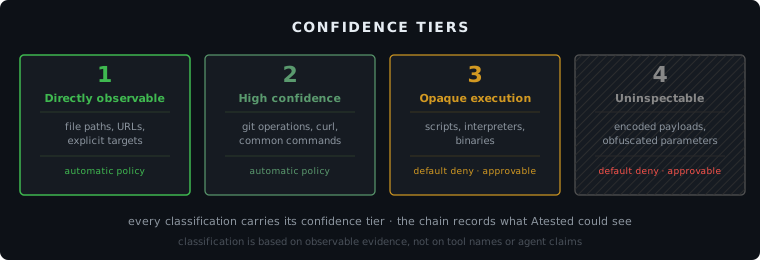
The four confidence tiers
Tier 1: Directly observable
The operation's effects are fully visible in its parameters. A Write(file_path="/src/app.js", content="...") is Tier 1. The classifier sees the path, knows the action is a write, and can check the path against policy. Most file operations (Read, Write, Edit, Glob, Grep) land here.
Tier 2: High-confidence inferred
The operation is a command execution, but the command is well-known and its behavior is predictable from the command string. Bash("git push origin main") is Tier 2. The classifier recognizes git push as a network-scope operation. It knows the patterns for about 40 common commands: git, curl, wget, ssh, npm, pip, docker, make, pytest, and others. Each command gets subcommand-level analysis (e.g., git push is network, git status is read-only).
Tier 3: Opaque execution
The entry point is visible but the behavior is unknown. Bash("python3 deploy.py") is Tier 3. The classifier sees that Python is being invoked with a script argument. It knows something will execute, but not what. Piped commands, subshells, and interpreter invocations all land here. The classifier flags these honestly: "I can see what's being launched but not what it does."
Tier 4: Uninspectable
The parameters contain encoded or obfuscated content. Base64 blobs, hex-encoded payloads, arguments that can't be parsed as text. The classifier detects encoding patterns and flags the operation as uninspectable. These default to DENY in the standard policy unless approved.
How tiers map to policy
The shipped policy rules handle Tier 1 and 2 operations automatically — reads, writes, moves, deletes, and directory operations within allowed directories are permitted. Well-understood Tier 2 commands (git, make, pytest) are also allowed.
Tier 3 and 4 operations are denied by default and surface for your approval. You review the evidence and decide whether to approve. Approvals persist until Atested detects a change in the operation.
Agent-internal operations
Some operations have no external side effects. TaskCreate, AskUserQuestion, WebSearch, EnterPlanMode, and similar agent-internal tools don't write files, run commands, or touch the network. The classifier recognizes these by name and classifies them as agent_internal at Tier 1. The default policy allows them unconditionally because there is no risk.
Unknown tools
When the classifier encounters an operation it hasn't seen before, it doesn't reject it. Unknown operations are auto-classified to the nearest category based on whatever evidence the parameters provide. If the arguments contain file paths, the classifier infers a file operation. If the arguments contain URLs, it infers a network operation. If nothing is recognizable, the action gets a Tier 3 opaque classification. Learned classifications are persisted so the same unknown action gets consistent treatment on subsequent encounters.
Sensitive paths
Certain paths are classified at privileged scope regardless of other evidence: /etc/, ~/.ssh/, ~/.gnupg/, ~/.aws/, ~/.config/, .env files, and paths containing /credentials, /secrets, /tokens, or /private_key. Operations targeting these paths hit the sensitive-path-deny rule early in the policy evaluation and are denied before general rules are checked.
Approvals
When an action is denied, you can review and approve it through the dashboard. The approval is recorded in the chain as its own signed record. If the action changes — different parameters, different target — the approval resets and you decide again. Approvals are scoped to the specific operation that was reviewed, not to the tool or category.
See policy rules for the full approval lifecycle.
Start attesting your AI operations
Stop worrying and start knowing in less than five minutes.